
[119b3e1af2] Network setup
![[119b3e1af2] Network setup](/content/images/size/w1200/2025/11/Screenshot-2025-11-03-at-23-42-18-Redpearl.png)
For my homelab, I’d like to reach internal services hosted under the redpearl.pw domain via HTTPS from any location. Certain services (like this blog) must be publicly accessible so visitors can view them. Let’s begin.
We’ll provision five virtual machines. To speed things up, we’ll rely on the handy proxmox‑helper‑scripts, which streamline the process with pre‑configured LXC containers.
| Service | Purpose | Amount |
|---|---|---|
| Adguard | DNS | 2 |
| Caddy | Routing & HTTPS | 1 |
“We’ll set up two AdGuard containers—one acting as the primary DNS server and the other as the secondary. Although a single instance could handle both roles, having two ensures the router’s DHCP assigns both addresses as DNS servers. In this phase we’ll also spin up the Caddy container.
After that, we’ll give each container a static IPv4 address. Assuming the gateway is 192.168.2.1, we’ll assign static IPs within the 192.168.2.xxx/24 range. Proxmox provides a Network tab for each LXC, which lets us configure those static addresses, as shown in the screenshot below.
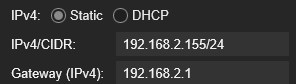
The address 192.168.2.155 is the static IP assigned to the Caddy container.
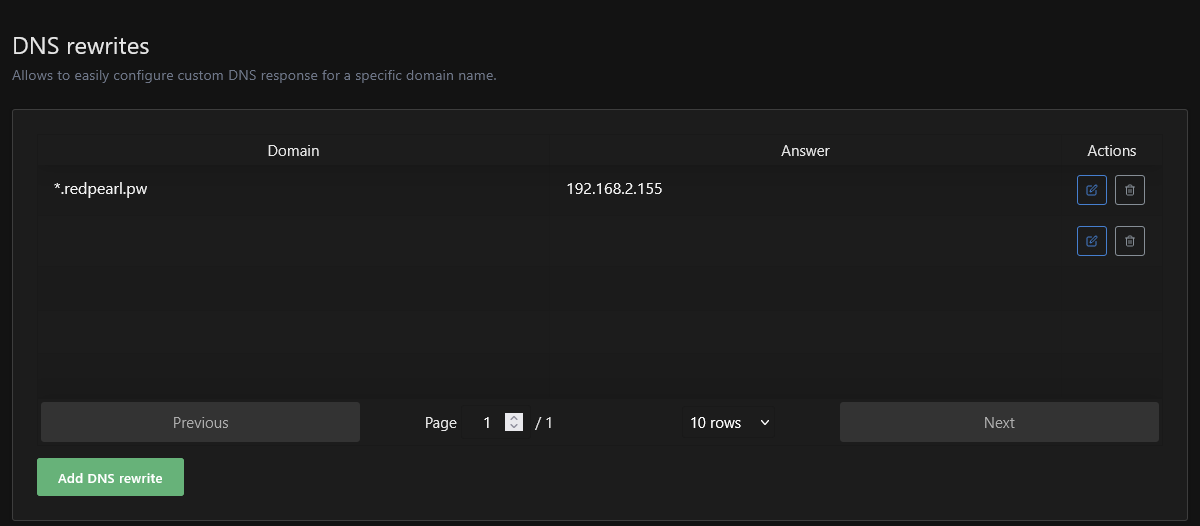
Once the AdGuard containers are configured, go to Filters → DNS rewrites and create a single entry: *.redpearl.pw → 192.168.2.155. With this rule in place, any HTTPS request that uses a subdomain of redpearl.pw will be directed to Caddy.
This is an ideal moment to add a few firewall rules. To activate the firewall for an LXC, you must turn it on in the following locations:
- Datacenter -> Firewall -> Options -> tick Firewall
- Node -> Firewall -> Options -> tick Firewall
- LXC -> Network -> net0 -> tick Firewall
- LXC -> Firewall -> Options -> tick Firewall

The firewall should operate on a whitelist basis: we first allow only the traffic we anticipate coming in, then block all other packets. In the screenshot above, the rules are applied solely to inbound traffic, leaving outbound traffic unrestricted.
Now lets access our DNS servers via their domains.
The addresses 192.168.2.148-192.168.2.149 are the static IPs assigned to the adguard containers.
dns.redpearl.pw {
    reverse_proxy 192.168.2.148:80
}
dns-secondary.redpearl.pw {
    reverse_proxy 192.168.2.149:80
}
After this configuration, dns.redpearl.pw will resolve to our primary AdGuard instance, marking the initial milestone in routing our HTTP services.
![[e4f9a2b7c1] Setting up HTTPS](/content/images/size/w600/2025/11/Screenshot-2025-11-12-at-22-24-54-Account-home-Giannispapcod7@gmail.com-s-Account-Cloudflare.png)
![[1607c63fe2] Initial homelab commit](/content/images/size/w600/2025/08/1024-1365-1.jpg)